A visual tool for assessing Git commits and GitHub Pull Requests
# Pharo Git Thermite Git Thermite is a **visual tool to assess GIT commits, GitHub Pull Requests, and Monticello commits**. Git Thermite provides a visual support to commit, usually presented in a textual fashion. Here is an example of a large commit:  The visualization is obtained directly from the *Monticello* window. The left hand side gives a summary of the change: - the change has many new lines of code and a few removed lines (top large green bar and a short red bar) - many classes have been modified and a few new classes are added (the middle bar has a small green bar and a large yellow bar) - many new and modified methods (lower green and yellow bar). The right hand side gives detail about these changes. - each inner box is a class. yellow = modified classes and green = new class - each inner-inner box is a method. ## Installation The following script installs Git Thermite in a Pharo 7 image: ```smalltalk Metacello new baseline: 'Thermite'; repository: 'github://ronsaldo/pharo-git-thermite/src'; load ``` ## Usage ### Iceberg integration For visualizing the local image changes to commit with Iceberg, there is a *Thermite* button in the dialog for reviewing the changes to commit.  ### Iceberg arbitrary commit comparison For visualizing arbitrary iceberg git commits with Git Thermite, there is the *Thermite -> Create Thermite visualization...* context menu in the repositories browser.  This menu entries opens a dialog for selecting the two git commits to visualize with Thermite, along with some options to customize the visualization.  ### Iceberg integration demo video A short demo video on how to use the Iceberg integration is available at: [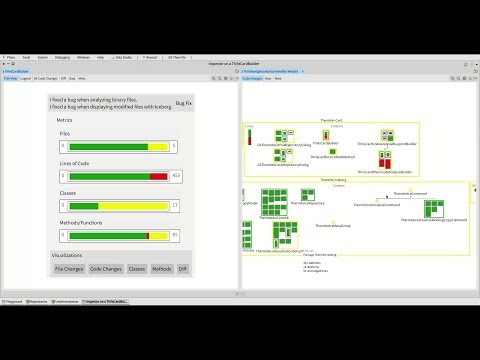](http://www.youtube.com/watch?v=TdBHpdyFgZE "Git Thermite Iceberg integration demo") ### Visualizing a local git commit For visualizing a local Git commit, you can use the dialog in the **World Menu -> Git Thermite -> Visualize local commit**.   **Thermite Local Commit Video Example:** https://youtu.be/LCHTiJ4nx3g In this dialog **Local Repository Path** is the path for a locally cloned git repository. **Commit Name** is the name of a git commit (or branch, tag, etc) as accepted by git. **Parent Commit Name** is the name of the commit to use for comparing against. By default this is set to **~1** which is a git notation for naming the immediate parent of the commit present in the **Commit Name** text input field. ### Visualizing a GitHub pull request For visualizing a GitHub pull request, you can use the dialog in the **World Menu -> Git Thermite -> Visualize pull request**.   **GithHub Pull Request Thermite Video Example:** https://youtu.be/f196btLfYxM In this dialog **GitHub Project Owner** is the name of the owner of the GitHub repository to analyze. **GitHub Project Name** is the name of the GitHub project to analyze. ### Visualizing Monticello commits Pharo Git Thermite adds some additional buttons into the Monticello Repository Browser. The **Thermite changes** buttons allows you to visualize the changes introduced by a single monticello commit using Pharo Git Thermite. The **Thermite parent changes** button allows you to select a parent commit for comparing using Pharo Git Thermite.  **Monticello Thermite Video Example:** https://youtu.be/02CUHBmm-K8 ### Legend  ## Feedback form For giving feedback on Git Thermite, you can use the [Google form.](https://docs.google.com/forms/d/e/1FAIpQLSeir6VlE3bR78oRsNAp9eHLkUn2Q016wEliOJN7tFlTmYFi8w/viewform?usp=sf_link)