A bridge to provide the ability to Pharo user to use Python's Matplotlib.
# MatplotLibBridge
A bridge to provide the ability to Pharo user to use Python's Matplotlib.
## Install
This project has been tested on Linux and Mac OS. If someone manage to use it on Windows, please let me know.
### Python side
Obviously, you need to have Python 3 installed on your machine. Furthermore, you need matplotlib package installed as well. The following link explains how to do it [install matplotlib](https://matplotlib.org/faq/installing_faq.html).
### Pharo side
To install this project in your image, open a playground and execute the following code snippet:
```
Metacello new
baseline: 'MatplotLibBridge';
repository: 'github://juliendelplanque/MatplotLibBridge/src';
load
```
This will install version 0.1 of the project. You should only depend on released versions for your projects. The master branch of this repository contains latest commits and might not be stable.
Once MatplotLibBridge is installed in your image, you need to configure [Python3Generator](https://github.com/juliendelplanque/Python3Generator) to use the Python interpreter you prefer. My advise is to use the FFI interpreter using: `P3GInterpreter useFFIInterpreter`. If your `python3` binary is located in a standard path in your file system, it should be fine, else you can manually set the path to `python3` binary using for example: `P3GInterpreter current pathToPython: '/usr/bin/python3'`.
## How to use MatplotLibBridge?
This page provides some examples to illustrate how to use MatplotLibBridge. For each example, the method `#show` is called when the plot is built. This method open an interactive window showing a preview of the plot. If you want to export the plot in a file, you can use `#generateIn:` which takes a `FileReference` as argument. This method creates an image file with a format corresponding to the extension of the file reference. The available formats are `.png`, `.svg` and `.pdf`. For example: `plot generateIn: '/tmp/foo.png'` will generate the `plot` in the file `/tmp/foo.png` in png format.
### Creating a line plot
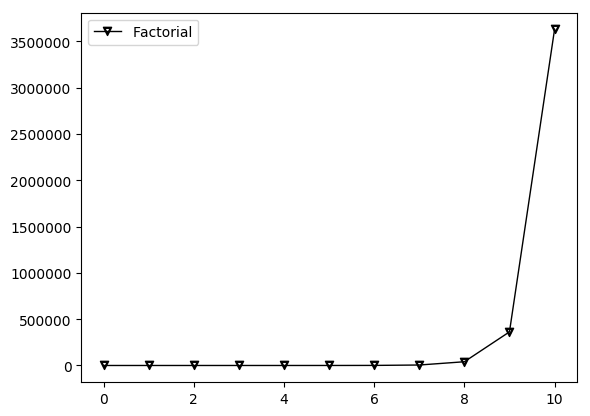
The following code snippet creates a line plot for the factorial function between 0 and 10. It also illustrates that it is possible to use LaTeX code as marker for the points. Using `#label:` message allows to give name to the line that will be displayed in a corner of the plot.
```
MLBLinePlot new
addPointsLine: [ :line |
line
points: ((0 to: 10) collect: [ :i | i @ i factorial ]);
marker: '$\triangledown$';
label: 'Factorial' ];
show
```
### Creating a line plot using Y-Block line
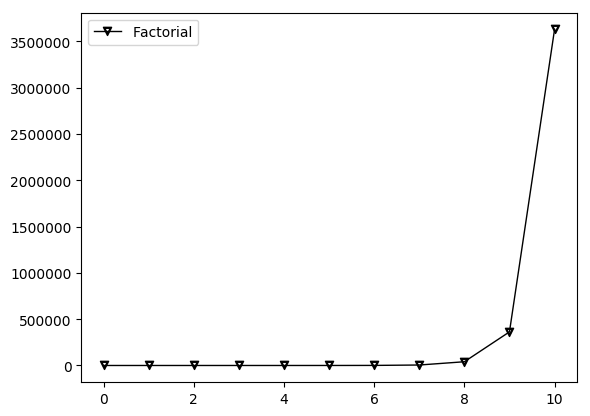
The following code snippet creates a line plot for the factorial function between 0 and 10 using MLBYBlockLine. It is totally equivalent to the preceding example (in the result) but this is another way to express the plot using MatplotLibBridge.
```
MLBLinePlot new
addYBlockLine: [ :line |
line
x: (0 to: 10);
yBlock: #factorial;
marker: '$\triangledown$';
label: 'Factorial' ];
show
```
### Creating multi-lines plot
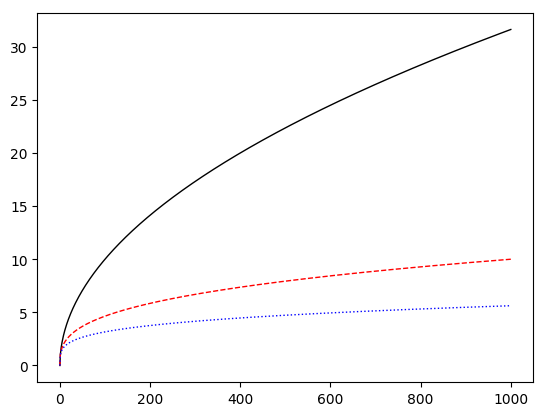
The following code snippet creates a multi-lines plot for the square root function, the third-root function and the fourth-root function between 0 and 1000. It also shows how to change the color of a line (using `#color:`) and how to change its style (using `#style:`). Available styles for a line can be accessed using `MLBLine>>#lineStyles`
```
MLBLinePlot new
addPointsLine: [ :line | line points: ((0 to: 1000) collect: [ :i | i @ i sqrt ]) ];
addPointsLine: [ :line |
line
points: ((0 to: 1000) collect: [ :i | i @ (i nthRoot: 3) ]);
color: Color red;
style: '--' ];
addPointsLine: [ :line |
line
points: ((0 to: 1000) collect: [ :i | i @ (i nthRoot: 4) ]);
color: Color blue;
style: 'dotted' ];
show
```
### Changing line width in line plot or multi-lines plot
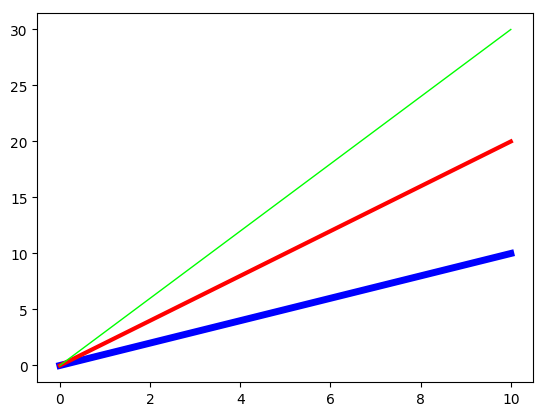
It is possible to configure the width of each line in a line plot using `#width:`.
```
MLBLinePlot new
addPointsLine: [ :line |
line
points: ((0 to: 10) collect: [ :i | i @ i ]);
width: 5;
color: Color blue ];
addPointsLine: [ :line |
line
points: ((0 to: 10) collect: [ :i | i @ (i * 2) ]);
width: 3;
color: Color red ];
addPointsLine: [ :line |
"#width = 1 if not specified."
line
points: ((0 to: 10) collect: [ :i | i @ (i * 3) ]);
color: Color green ];
show
```
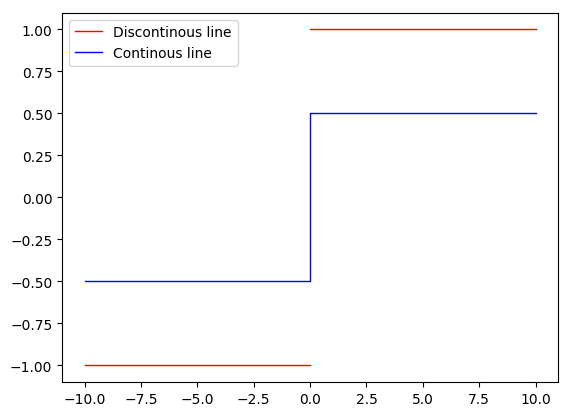
### Discontinuous lines in line plot or multi-lines plot
If you create points having `Float nan` as x or y, it allows to create discontinuous lines.
```
MLBLinePlot new
addPointsLine: [ :line |
line
points:
((-10 to: -0) collect: [ :i | i @ 1 negated ]) , {(0 @ Float nan)}
, ((0 to: 10) collect: [ :i | i @ 1 ]);
label: 'Discontinous line';
color: Color red ];
addPointsLine: [ :line |
line
points:
((-10 to: -0) collect: [ :i | i @ 0.5 negated ])
, ((0 to: 10) collect: [ :i | i @ 0.5 ]);
label: 'Continous line';
color: Color blue ];
show
```
### Set an axis to be in logarithmic scale
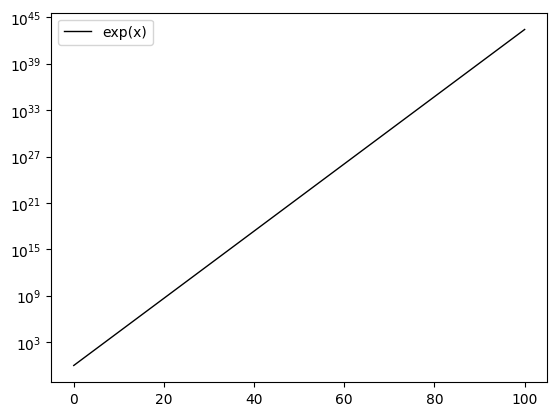
Calling the method `#logScale` in #configYAxis block makes the scale of the concerned axis logarithmic. Other scales are available, see `MLBAbstractAxis>>validScales`.
```
MLBLinePlot new
addPointsLine: [ :line |
line
points: ((0 to: 100) collect: [ :i | i @ i exp ]);
label: 'exp(x)' ];
configYAxis: [ :yAxis |
yAxis logScale ];
show
```
### Creating a bar plot
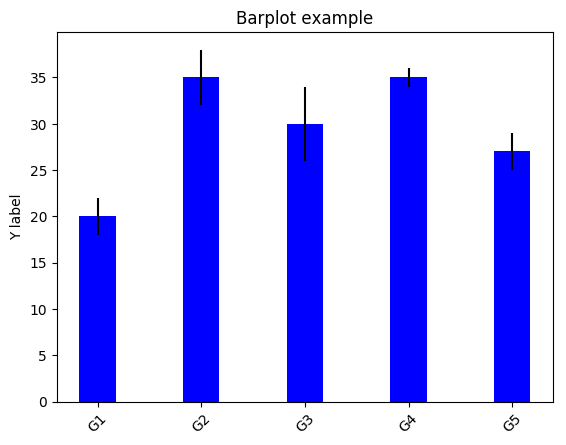
The following code snippet creates a bar plot for some data and to display their standard deviation. This example also illustrates how to do some basic configuration of x and y axes (`#configXAxis:` and `#configYAxis:`).
```
|data std |
data := #(20 35 30 35 27).
std := #(2 3 4 1 2).
MLBBarPlot new
data: data;
labels: #('G1' 'G2' 'G3' 'G4' 'G5');
color: Color blue;
configXAxis: [ :xAxis |
xAxis
labelsRotation: 45 ];
configYAxis: [ :yAxis |
yAxis
title: 'Y label' ];
title: 'Barplot example';
errorBars: std;
errorBarsColor: Color black;
alignLabelCenter;
show.
```
### Creating an horizontal box plot
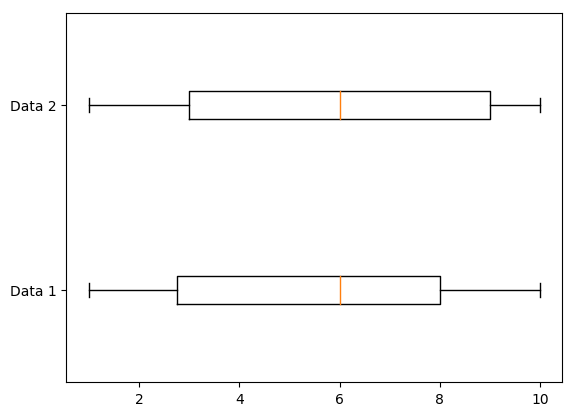
The following code snippet creates an horizontal box plot for some random data.
```
MLBBoxPlot new
dataList: {((1 to: 100) collect: [ :i | (1 to: 10) atRandom ]) . ((1 to: 100) collect: [ :i | (1 to: 10) atRandom ])};
beHorizontal;
configYAxis: [ :axis|
axis
labels: #('Data 1' 'Data 2') ];
show
```
### Creating a stacked bar plot
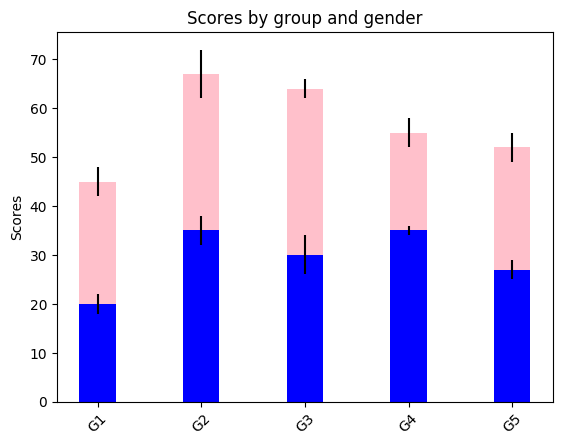
The following code snippet creates a stacked bar plot for some data and to display their standard deviation. The `#dataList` of a `MLBStackedBarPlot` should be a collection of collections of the same arity. It also shows how to rotate the labels of an axis.
```
| menMeans womenMeans menStd womenStd data std |
menMeans := #(20 35 30 35 27).
womenMeans := #(25 32 34 20 25).
menStd := #(2 3 4 1 2).
womenStd := #(3 5 2 3 3).
data := (1 to: menMeans size) collect: [ :i |
{ menMeans at: i. womenMeans at: i } ].
std := (1 to: menStd size) collect: [ :i |
{ menStd at: i. womenStd at: i } ].
MLBStackedBarPlot new
dataList: data;
colorList: {Color blue. Color pink};
title: 'Scores by group and gender';
configXAxis: [ :xAxis |
xAxis
labelsRotation: 45;
labels: #('G1' 'G2' 'G3' 'G4' 'G5') ];
configYAxis: [ :yAxis |
yAxis
title: 'Scores' ];
errorBarsList: std;
errorBarsColorList: { Color black . Color black };
alignLabelCenter;
show.
```
### Creating a vertical box plot
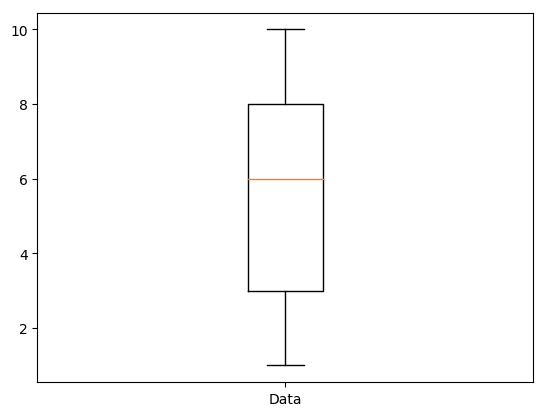
The following code snippet creates a vertical box plot for some random data. No need to call `#beVertical` since this is the default orientation of the plot.
```
MLBBoxPlot new
dataList: {((1 to: 100) collect: [ :i | (1 to: 10) atRandom ])};
configXAxis: [ :xAxis|
xAxis
labels: #('Data') ];
show
```
### Creating a pie plot
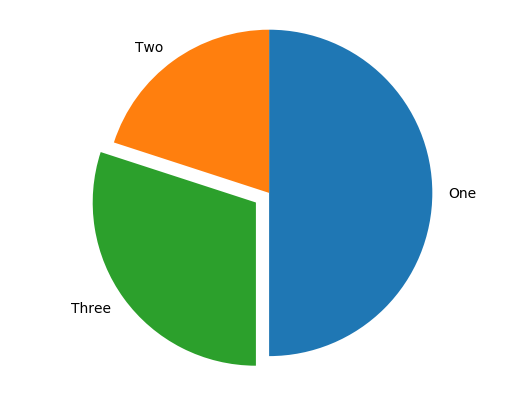
The following code snippet creates a pie box plot for some data that sum to 100. You can optionally add `labels:`, set the a shadow or not (`hasShadow:`), configure the `axis:` (here we want to have a round pie, so we set it to `'equal'`), explode each part of the pie at different degrees (here only the part concerning `30` data is exploded) and choose the start angle.
```
MLBPiePlot new
data: #(50 20 30);
labels: #(One Two Three);
hasShadow: false;
axis: 'equal';
explode: #(0 0 0.1);
startAngle: -90;
show
```
### Creating a scatter plot (new API)
The following code snippet creates a scatter plot for some random data. The principle is to create MLBScatterData, to set them a position, a color, a size and a shape
```
MLBScatterPlot2 new
data: ((1 to: 20) collect: [ :i |
(MLBScatterData position: (1 to: 15) atRandom @ (1 to: 15) atRandom size: (20 to: 500) atRando