Pyramid is a Graphical User-Interface (GUI) builder and editor for Bloc and Toplo.
[](https://pharo.org/download) [](https://pharo.org/download) [](https://pharo.org/download) [](./LICENSE) [](https://github.com/OpenSmock/Pyramid/actions/workflows/CI.yml) # Pyramid <picture> <source media="(prefers-color-scheme: light)" srcset="/assets/PyramidLogotype.svg"> <source media="(prefers-color-scheme: dark)" srcset="/assets/PyramidLogotypeDark.svg"> <img width="400" src="/assets/PyramidLogotype.svg"> </picture> Pyramid is an User-Interface (UI) editor. 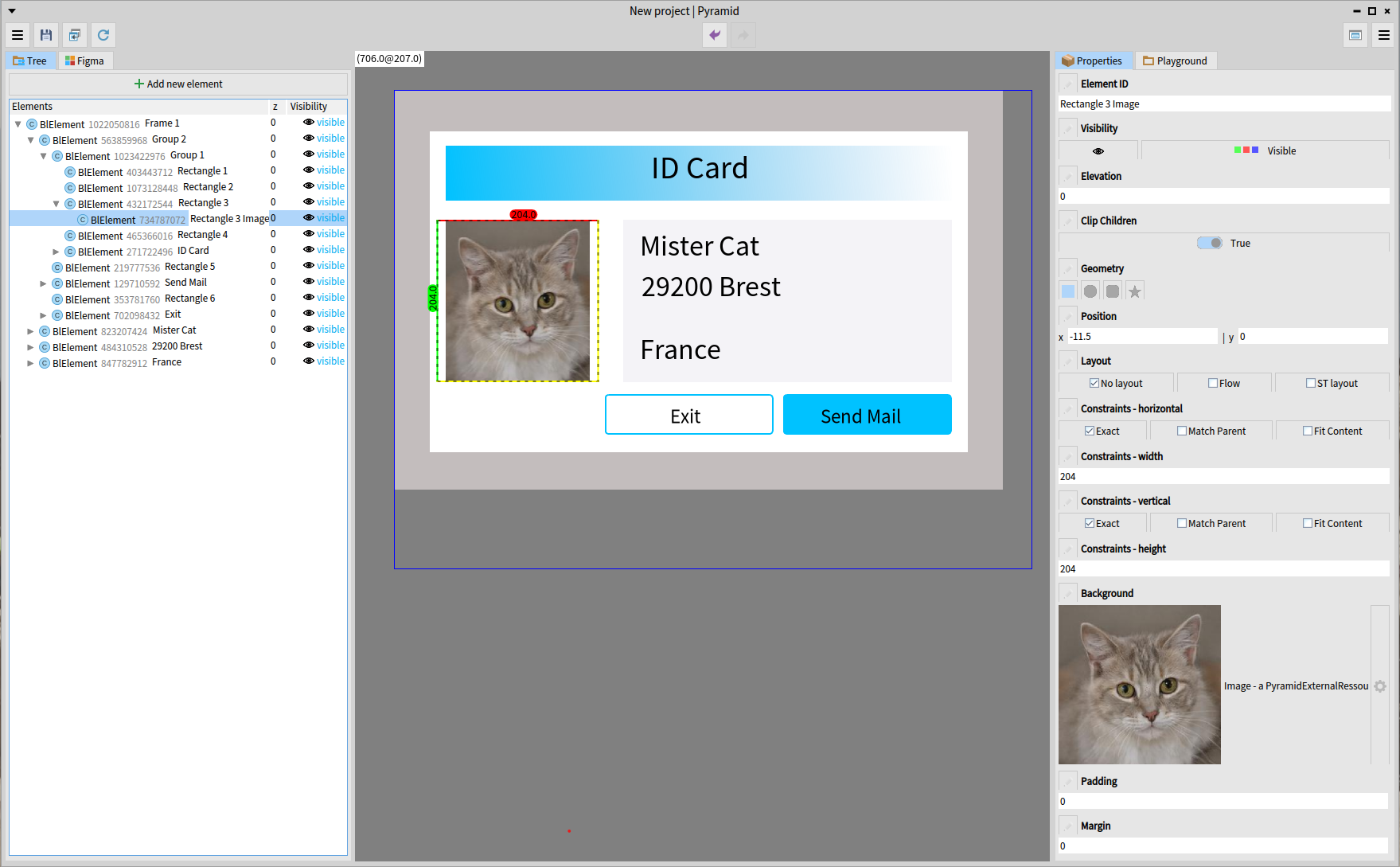 Pyramid is a WYSIWYG application (What You See Is What You Get) in other terms it allows you to visually design the expected outcome. Pyramid helps you to produce final UI in Bloc and Toplo libraries. The designed UI persistence is based on the "-Serialization" projects below. Pyramid saves a designed UI into a method as a string. Refer to the "-Serialization" projects to learn more. You can add plugins into Pyramid to extend the editor capacities or create [your own plugin](https://github.com/OpenSmock/Pyramid/wiki/Add-a-new-plugin-to-Pyramid) with your specific functions! <img src="https://github.com/OpenSmock/Pyramid/assets/49183340/0ddc1ac3-bd6e-4f4b-bfb4-60eac4f48e39" width="200"> ## <img src="/assets/PyramidPinPtah.svg" width="75" height="75" align="bottom"> How to get Pyramid You can load a release version of Pyramid or the latest development version. Beware that Pyramid is currently in alpha development. The API is subject to significant changes, and stability is not guaranteed. Projects created during the alpha version are not designed to be compatible with newer versions of Pyramid. Pyramid is available with Bloc and Toplo as defaults. To install a version of Pyramid, use one of the following scripts inside a playground. ### Latest development version ```st Metacello new baseline: 'Pyramid'; repository: 'github://OpenSmock/Pyramid:main'; onConflictUseLoaded; load ``` ### Release version We advise you to use dependencies committed at the date of the Pyramid release (Bloc, Bloc-Serialization, etc.) to ensure compatibility with a release of Pyramid. ```st Metacello new baseline: 'Pyramid'; repository: 'github://OpenSmock/Pyramid:alpha8'; onConflictUseLoaded; load ``` ### Add in your baseline ```st spec baseline: 'Pyramid' with: [ spec repository: 'github://OpenSmock/Pyramid:main' ]. ``` ## <img src="/assets/PyramidPinPtah.svg" width="75" height="75" align="bottom"> How to use Pyramid ### Create a new project Open the Pyramid menu from the Library tab and click `New Project`. 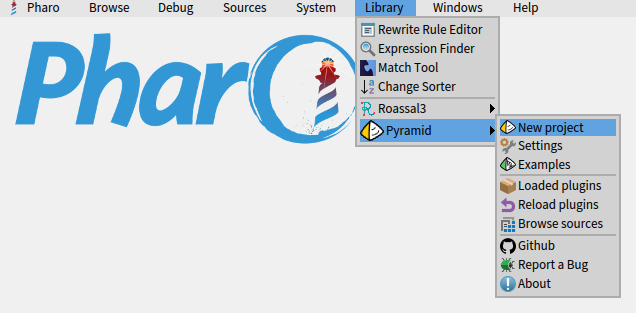 Then the project view appears in a new window.  ### Add and setup graphical elements Use the add button to add graphical elements in your project view and edit them with the properties panel. https://github.com/user-attachments/assets/44796af0-95d7-4e29-b28b-fdedfdbe7a85 ### Test behavior in the editor Use the test/edit button to switch between the edit mode and the test mode. https://github.com/OpenSmock/Pyramid/assets/49183340/a85d8c01-89dd-472c-ab4e-41d51a8629dd ### Save and Edit a project Setup the project to store your view into a Class. When your project is saved into a method, you can see the preview on the `Pyramid preview` tab. By default the element will be saved as source code. Use the `Pyramid preview` tab to edit an existing project. You can edit your project with Pyramid or use the code browser. https://github.com/user-attachments/assets/14711a00-b31a-4915-a634-3685bfe141f7 ### Test a project Use the `Pyramid preview` tab to test an existing project. https://github.com/OpenSmock/Pyramid/assets/49183340/12a916e5-06d1-426f-954c-2e4e911475e1 ### Tips To edit a `BlElement` instance or a `BlSpace` instance into Pyramid : ```st element editWithPyramid. space editWithPyramid. ``` You can edit in Pyramid all opened BlSpace with the `F12` keyboard shortcut, this feature can be disabled in the settings. When a window is open in Pyramid, an image is displayed on it to attract the user's attention: https://github.com/OpenSmock/Pyramid/assets/49183340/0c66a3ac-7bea-48c1-b1e8-0b093b1db4d5 ## <img src="/assets/PyramidPinPtah.svg" width="75" height="75" align="bottom"> Documentation [User manual is available here](docs/user_documentation.md) [Version française disponible ici](docs/documentation_utilisateur.md). ## <img src="/assets/PyramidPinPtah.svg" width="75" height="75" align="bottom"> Plugins  - [FigmaToWorld](https://github.com/OpenSmock/Pyramid-Plugins-FigmaToWorld) plugin provides capacities to import projects designed with [Figma](https://www.figma.com) ## <img src="/assets/PyramidPinPtah.svg" width="75" height="75" align="bottom"> Dependencies  - [Bloc-Serialization](https://github.com/OpenSmock/Bloc-Serialization) - Bloc serialization features to store/unstore BlElements. - [Toplo-Serialization](https://github.com/OpenSmock/Toplo-Serialization) - Toplo serialization features to store/unstore ToElements. - [PharoBackwardCompatibility](https://github.com/jecisc/PharoBackwardCompatibility) - Automatically ensure compatibility with old versions of Pharo. ## <img src="/assets/PyramidPinPtah.svg" width="75" height="75" align="bottom"> License <picture> <source media="(prefers-color-scheme: light)" srcset="/assets/PyramidLogotypeCartoucheSimple.svg"> <source media="(prefers-color-scheme: dark)" srcset="/assets/PyramidLogotypeCartoucheSimpleDark.svg"> <img width="400" src="/assets/PyramidLogotypeCartoucheSimple.svg"> </picture> This project is licensed under the MIT License - see the [LICENSE](LICENSE) file for details.