Pharo3DawnTheme is a dark theme for Pharo 3. Beautiful warm palette. If you're used to Sublime, you'll love it
Pharo3DawnTheme
===============
Pharo3DawnTheme is a dark theme for Pharo 3. Beautiful warm palette. If you're used to Sublime, you'll love it
Based on the refreshing work of Esteban Lorenzano and the heroic Pharo team.
##Screenshot
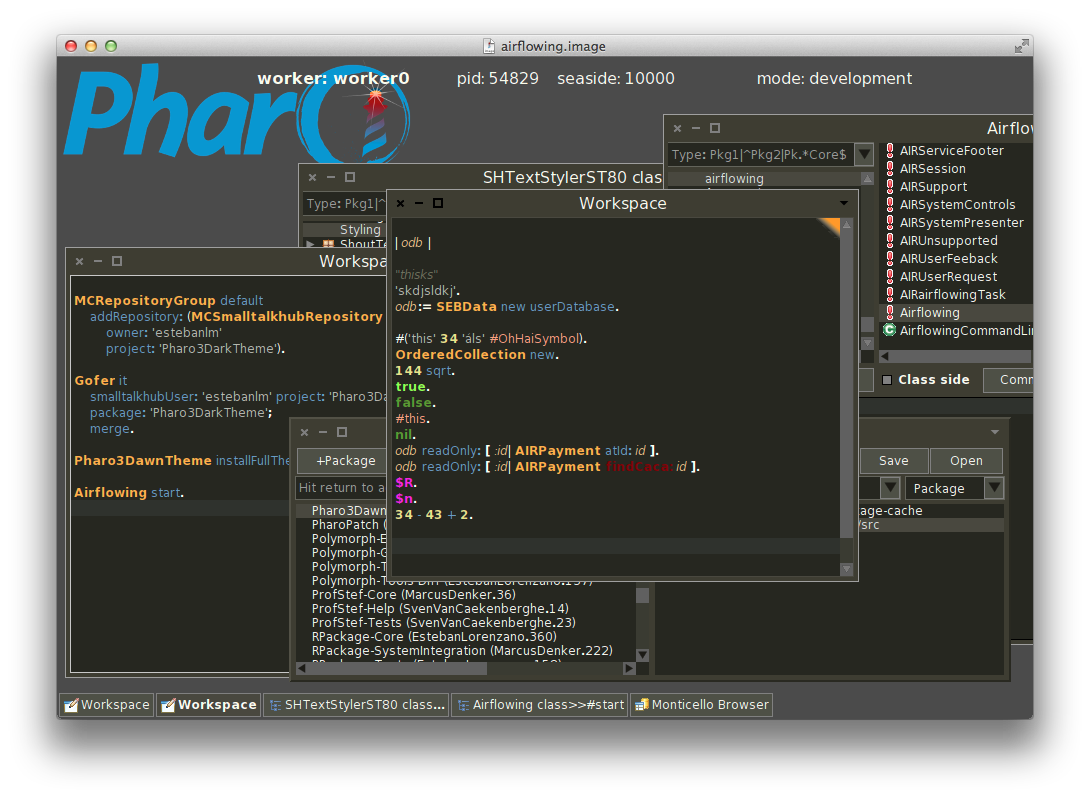
*Is your Pharo able to github already?*
Gofer new
url: 'http://smalltalkhub.com/mc/Pharo/MetaRepoForPharo30/main';
configurationOf: 'GitFileTree';
loadStable.
##Install instructions
1. Get a Pharo 3 image and run this in a workspace:
MCRepositoryGroup default
addRepository: (MCSmalltalkhubRepository
owner: 'estebanlm'
project: 'Pharo3DarkTheme').
Gofer it
smalltalkhubUser: 'estebanlm' project: 'Pharo3DarkTheme';
package: 'Pharo3DarkTheme';
merge.
2. After that, evaluate this other piece of code:
| repo |
repo := MCFileTreeGitRepository fromZnUrl: (ZnUrl fromString: 'gitfiletree://github.com/sebastianconcept/Pharo3DawnTheme.git?protocol=https&dir=src&branch=master').
Gofer it
repository: repo;
package: 'Pharo3DawnTheme';
load.
(Smalltalk at: #Pharo3DawnTheme) installFullTheme.
3. Say thanks and share your joy with another citizen of the Multiverse
###*Pharo Smalltalk
Getting a fresh Pharo Smalltalk image and its virtual machine is as easy as running in your terminal:
wget -O- get.pharo.org/30+vm | bash
_______
MIT - License
2014 - [sebastian](http://about.me/sebastianconcept)
o/