Pharo implemintation for Arduino Serial Monitor
# ArduinoSerialMonitor Pharo implemintation for Arduino Serial Monitor 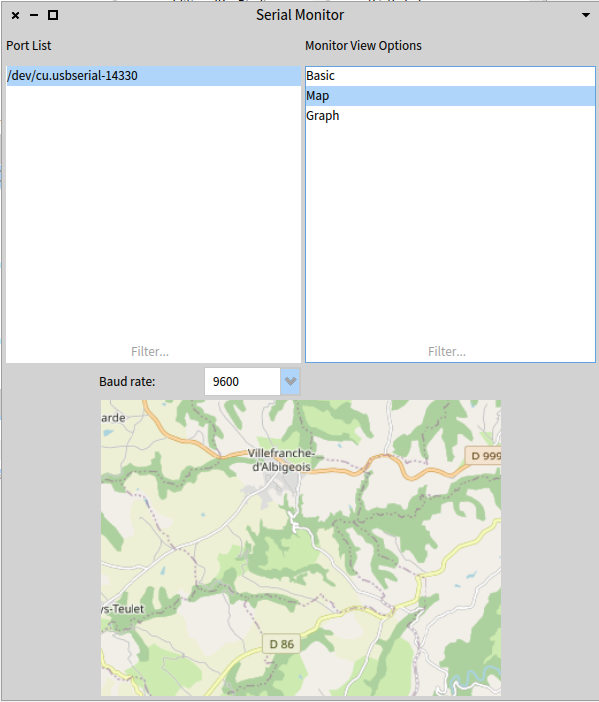 # Installation Use iceberg to clone this repository (`https://github.com/Oriez/ArduinoSerialMonitor.git`). # Usage You will find 2 packages - * `SerialMonitorViews` - The graphical modules * `SerialMonitorModels` - The serial functions classes To run the serial monitor in the Playground - `ArduinoSerialBrowser new openWithSpec.` (assuming you have an Arduino connected to your PC) # Available views * Basic - Text view, like in Arduino IDE. * Map - Show realtime location (text should be formatted like this `<lat>@<lon>`) * Graph - realtime graph showing a positive / negative level. ### How to add a new view? 1. Extend `ArduinoSerialBasicMorph` class (under SerialMonitorViews) - - Create class initialize function that will init a self object that hold a model (of type `ArduinoSerial`) and add your view to this morph (addMorph). 2. Extend `ArduinoSerial` class (under SerialMonitorModels) - - To create a model that handle the string parsing and update the model each stepTime. - Init your model with an update function or a variable that you will use each time a text is parsed from the Arduino. 3. connect your morph to the main class `ArduinoSerialBrowser` - - Add it your view name to `buildMonitorOptionsList` and init your morph in `selectOption` (using the same name you selected for your view)