Conveniently browse, deactivate and reactivate halts and breakpoints
# HaltManager HaltManager provides a window showing all the breakpoints and halt messages of the system, and allows one to toggle them on/off with a simple click. Halt messages can also be toggled via source code rewriting. The deactivation/reactivation feature is available in all code browsers, not only in the HaltManager window. ## Installation ```Smalltalk Metacello new baseline: 'HaltManager'; repository: 'github://dupriezt/HaltManager/src'; load ``` ## Usage ### 1) Opening HaltManager HaltManager is accessible via the Tools part of the world menu. 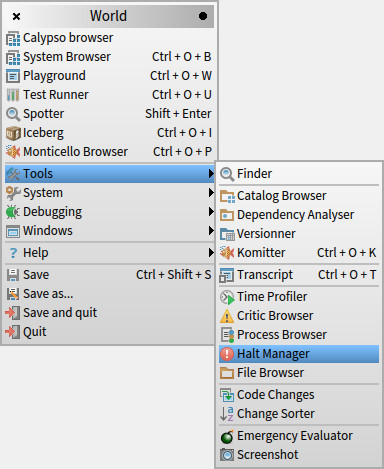 HaltManager shows all the methods in the system that contain breakpoints (and their flavours like one-time only breakpoints), halts (and their flavours like haltOnce, haltIf:...) as well as deactivated breakpoints and halts (and their flavours).  ### 2) Deactivating breakpoints and halts Hovering over the red icon in the gutter will bring up the deactivation options. Click the one you would like to use.  #### 2.1) Deactivation by metalink Choosing this option will leave the source code intact, but rewrite the underlying bytecode to prevent the node from stopping the execution. Deactivated nodes are highlighted in blue to signal their condition. **Caution:** *If the method is later recompiled, the node will no longer be deactivated.*  #### 2.2) Deactivation by rewriting This option is only available for halt messages, and allows to deactivate them by rewriting them in the source code to inactive variants (`halt` becomes `inactiveHalt`, `haltOnce` becomes `inactiveHaltOnce`...).  ### 3) Reactivation To reactivate a breakpoint or halt that has been deactivated, hover over the red icon in the gutter and click the 'Reactivate' or 'Reactivate by rewriting' button.  