README excerpt
# WebClientPlus
This is a package for Cuis Smalltalk that simplifies development
of HTTP endpoints and web applications.
It defines classes that extend classes from the WebClient package.
Perhaps the improvements this package makes
should be merged into the WebClient package.
The main improvements this adds over the WebClient package are:
- ability to serve static files with a "Content-Type" header
that is appropriate for the file extension
- an easier way to define routes
- ability to access path parameters in route handlers
- ability to access query parameters in route handlers
## Basic Example
Here is a taste of what it's like to implement a web application using this package.
This uses a bit of htmx which is a client-side JavaScript library
that simplifies web development.
I wrote a book about htmx recently.
See [Server-Diven Web Apps with htmx](https://pragprog.com/titles/mvhtmx/server-driven-web-apps-with-htmx/).
Here's a class for a custom web server:
```smalltalk
WebServerPlus subclass: #HtmxServer
instanceVariableNames: ''
classVariableNames: ''
poolDictionaries: ''
category: 'WebClientPlus'
```
Static files (only `demo.css` in this example) are served from the `public` directory
which is a subdirectory of the `Cuis-Smalltalk-Dev-UserFiles` directory.
Handlers for routes can be specified with a block or a method selector.
The route for `GET /version` uses a block, which is ideal when the implementation is small.
The block returns text which is the version of Cuis that is running.
The route for `GET /` uses the method selector `#index:`.
That method returns HTML which is created by the `WebContext` class method `html:`.
That takes an array whose first item is an HTML element name.
The remaining array items can be `Association` objects to specify HTML attributes
or other objects to specify HTML element contents.
The `initialize` method below configures the directory from which static files are served,
and it configures the supported routes.
```smalltalk
initialize
super initialize.
self staticFilePath: 'public'.
self method: #GET path: '/version' handler: [ :context |
context text: (SystemVersion current versionString)
].
self method: #GET path: '/' handler: #index:.
```
The `#index:` method below is used by the `GET /` route.
```smalltalk
index: aWebContext
| spec |
spec := Dictionary newFrom: {
#title->'My htmx Demo2'.
#stylesheets->#('demo.css').
#scripts->#('https://unpkg.com/htmx.org@2.0.3').
#body->{
{#h1. 'My htmx Demo'}.
{#button. 'hx-get'->'/version'. 'hx-target'->'#version'. 'Get Version'}.
{#div. #id->'version'}
}
}.
aWebContext document: spec.
```
After cloning this repository, copy the `public` directory
to your `Cuis-Smalltalk-Dev-UserFiles` directory.
Then evaluate the following expressions in a Workspace
to start the web server defined above.
```smalltalk
Feature require: 'WebClientPlus'.
server := HtmxServer new.
server listenOn: 3000.
```
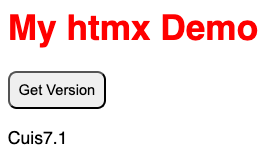
Then browse localhost:3000.
When the "Get Version" button is clicked, a request is sent to the server
to get the version of Cuis Smalltalk that is running.
The text that is returned is placed inside the element with the id "version".
## Defining CRUD Endpoints
See the `DogWebServer` class which implements endpoints for
all the CRUD operations needed to manage a collection of dog descriptions.
## Headless Server
Here are steps to run a web server in headless mode.
1. Open the base image.
1. Open a Workspace.
1. Enter and evaluate the following expressions in the Workspace:
```smalltalk
Feature require: 'WebClientPlus'.
HtmxServer new listenOn: 3000
```
1. Open the World menu and select "Save Image as ...".
1. Enter a name like "HtmxServer", which is
a demo server in the WebClientPlus package.
1. Open the World menu and select "Quit without saving".
1. Confirm by click "Yes".
1. Create a shell script like the following in the file `web-server-demo`:
```bash
!/usr/bin/env zsh
CUIS_DIR=$SMALLTALK_DIR/Cuis-Smalltalk-Dev
VM=$CUIS_DIR/CuisVM.app/Contents/MacOS/Squeak
IMAGE=$CUIS_DIR/CuisImage/WebClientPlus.image
$VM -headless $IMAGE
```
1. Make the shell script executable.
```bash
chmod a+x web-server-demo
```
1. Start the web server by entering the following:
```bash
./web-server-demo
```
1. Browse `localhost:3000`